 World Clock
World Clock for iPhone and iPad
See every time zone at a glance
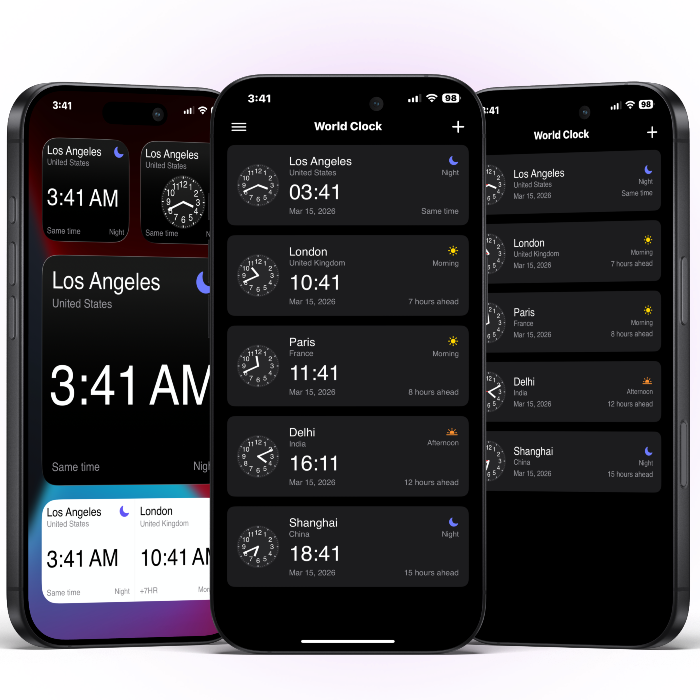
World Clock helps you track time zones worldwide, compare locations, and plan across cities and countries so you avoid missing a meeting, call, or event.


Available on iPhone, iPad, and Android
Everything you need in one glance
Built for remote life, travel planning, and staying close to people you love.
Multi-city world clock
Add unlimited cities and keep them all visible in a clean, balanced layout.
Compare locations
Compare multiple locations at once so you always know the right time.
Time formats
Switch between 12-hour and 24-hour formats with digital or analog clocks.
Widgets and offline
Use responsive widgets, dark mode, and offline access for quick checks.
Built for life across time zones
Whether you manage a global team or have family overseas, World Clock keeps everyone aligned.
Remote teams
Know when your teammates are online and pick times that respect everyone's day.
Remote teams
Know when your teammates are online and pick times that respect everyone's day.
Frequent travelers
Track home and destination time side by side so you always know the best hour to land, call, or rest.
Frequent travelers
Track home and destination time side by side so you always know the best hour to land, call, or rest.
Families abroad
Stop guessing and start calling at the perfect time. Keep loved ones close across continents.
Families abroad
Stop guessing and start calling at the perfect time. Keep loved ones close across continents.
How it works
Add your cities, compare locations, and personalize your view.
Add your cities
Search and pin the locations you care about, from coworkers to family and favorite destinations.
Compare at a glance
Compare multiple locations instantly so you never guess the right hour.
Make it yours
Choose digital or analog views, pick 12 or 24-hour time, and add widgets.
Why people like World Clock
Small details that make a big difference when time matters.
Ready to stop the time math?
Stay in sync across every city.
Download World Clock and keep every city in sync, whether you are coordinating a team, traveling, or staying close to home.
FAQ
Quick answers to common questions about World Clock.
World Clock is free to download and includes an in-app purchase for World Clock Pro ($4.99).
World Clock supports iPhone and iPad, plus Mac (Apple silicon) and Apple Vision. It requires iOS 17 or later.
World Clock includes real-time updates and daylight saving time support.
Yes. Offline access is supported for your saved cities.
Yes. World Clock includes responsive widgets for quick access to your cities.